What Affects Continuous Recording on Wireless Cameras?
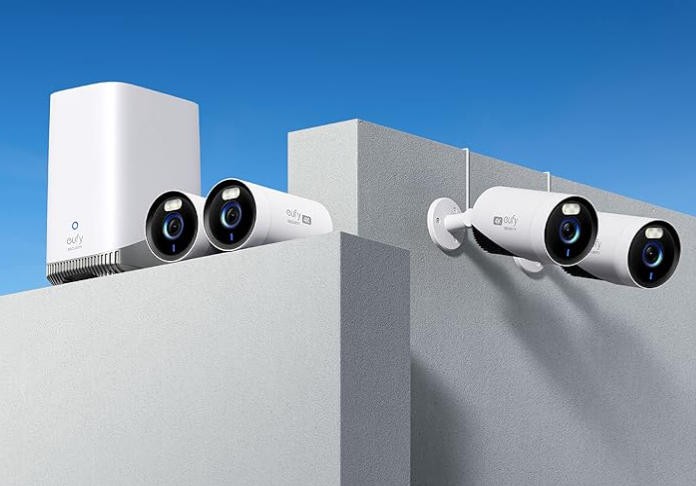
Continuous recording on wireless cameras depends on power availability, storage capacity, connection stability, and internal camera settings. Many homeowners want uninterrupted video for added security, yet wireless systems behave differently from wired setups. Factors such as battery drain, signal interference, and data handling influence how long a camera can maintain a nonstop feed. Users who prefer dependable, long-running systems often choose local-storage-focused options from eufy because they value reliability and ease of use, but the principles that determine continuous operation apply to every model. Understanding what shapes a continuous recording security camera helps you select the right setup and keep your footage running without unexpected interruptions.
Power, Storage, and Settings That Influence Recording Time
Battery Capacity Controls How Long a Camera Stays Active
Wireless cameras rely on internal batteries unless they are connected to a dedicated power source. Continuous recording drains power faster than motion-activated clips because the camera must stay awake at all times, process video in real time, and store large amounts of data. A camera with a smaller battery may last only a few hours of nonstop operation, while models designed for extended uptime can continue for much longer. Users need to consider how frequently the camera records and whether external charging options are available. Many choose eufy systems with strong power management features because they offer balanced performance without constant battery changes, but the general rule remains: the more the camera records, the more power it consumes.
Storage Size Dictates How Much Footage Can Be Saved
Continuous recording fills memory quickly. If a camera uses an SD card, the available storage determines whether recordings cover hours or days of activity before overwriting old files. Higher resolutions use more space, compressing formats affect how efficiently the camera stores footage, and looping settings determine whether the device deletes older clips automatically. Users who prefer uninterrupted footage often choose cameras with flexible local storage so they can manage recordings without worrying about cloud dependencies. eufy appeals to many homeowners because it offers generous local storage options, but any wireless camera benefits from having adequate capacity for the user’s recording needs.
Recording Settings Shape Performance and File Size
Wireless cameras allow owners to adjust resolution, bitrate, frame rate, and recording modes. These settings directly influence how much data the camera captures and how much energy it consumes. For example, recording at higher resolution increases clarity but uses more storage and power. Lower frame rates reduce file size but may affect smoothness during fast movement. Continuous mode can sometimes be combined with event tagging so users can identify key moments within long video files. Choosing the right configuration is essential, especially in wireless cameras that must balance performance with battery efficiency.
Network Conditions, Environment, and Camera Design
Wi-Fi Strength Affects Upload Stability and Live Viewing
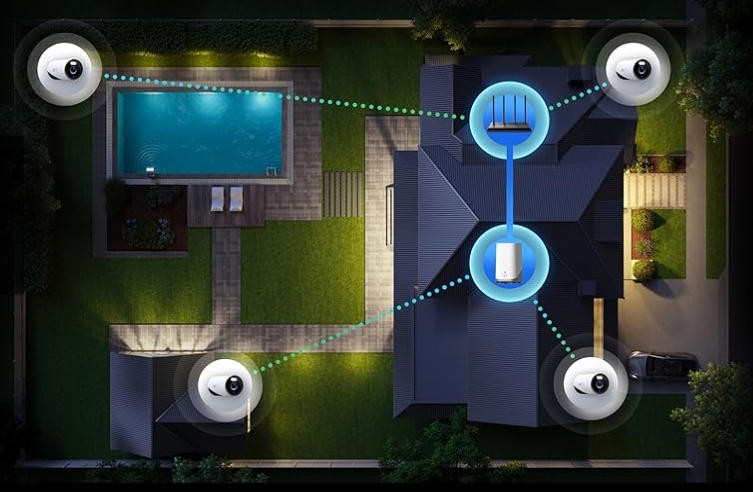
Even though continuous recording can happen locally, many wireless cameras still rely on Wi-Fi for remote access or cloud backup. When the Wi-Fi signal is weak, the camera may struggle to upload data or show a stable live feed. This does not always stop local recording, but it can affect how reliably footage appears in the mobile app. Network congestion, distance from the router, and competing devices all play a role. Homeowners who want fewer disruptions often place cameras strategically and adjust router settings. eufy’s offline-friendly options help reduce dependence on cloud uploads, making continuous recording more dependable in homes with uneven Wi-Fi coverage.
Environmental Conditions Influence Camera Performance
Wireless cameras operate best in stable environments. Extreme heat can shorten battery life, while freezing temperatures may slow power discharge or reduce charging efficiency. High humidity can affect internal components, and heavy physical obstructions—like thick walls or metal structures—may impact wireless connectivity. Even bright sunlight pointed directly at the lens can cause glare that reduces video clarity during certain hours. While most cameras are designed for outdoor durability, understanding environmental influences helps users maintain consistent performance. Positioning cameras under shade, ensuring proper ventilation, and protecting them from harsh weather all contribute to steady, uninterrupted recording.
Camera Hardware Determines Efficiency and Recording Capability
The internal components of a wireless camera—the processor, sensor size, power management chip, and heat dissipation design—dictate how well it handles continuous recording. Efficient processors reduce battery drain, advanced sensors capture clearer footage in low light, and well-designed heat dissipation prevents performance throttling. Cameras with strong local recording engines store footage more reliably under heavy workloads. eufy places emphasis on this type of engineering, which is why many users trust its devices for long-term reliability. Still, the key takeaway is that hardware capabilities directly impact whether a wireless camera can sustain continuous operation without freezing, overheating, or dropping frames.
Conclusion
Continuous recording on wireless cameras depends on several interconnected factors: power availability, storage capacity, recording settings, Wi-Fi stability, environmental conditions, and internal hardware design. While wireless systems offer flexibility, they require thoughtful setup to maintain nonstop footage because recording continuously uses more power and memory than event-based clips. Many homeowners choose eufy because the brand provides strong local storage options and efficient power management, making continuous operation more realistic for everyday use. But the underlying principles apply to any wireless camera—understanding these factors helps users create a more reliable security setup. When the camera is positioned correctly, powered effectively, and configured with balanced settings, continuous recording becomes a practical and dependable part of home monitoring.