How to remove ‘AI Dreams’ on Snapchat 2026 Guide
Are you tired of the bizarre and often surreal ‘AI Dreams’ popping up on your Snapchat. This growing trend may leave you questioning how to remove ‘AI Dreams’ on Snapchat and what it means for your social media landscape.
Here, we’ll provide a straightforward guide on eliminating this feature, empowering you to tailor your profile to your liking. By the end of this article, you’ll have the tools to maintain a more authentic social media presence.
The ‘AI Dreams’ feature on Snapchat offers users a unique way to engage with their selfies. It allows them to transform their own images into personalized, AI-generated artwork.
By integrating users’ faces into a variety of creative and themed backgrounds, this feature sparks imagination and creativity.
Every user can access the Dreams Pack, which includes eight stunning AI-generated images at no cost. This is a fantastic introduction to the feature, allowing users to explore its potential.
For those seeking more variety, additional packs are available for purchase through the app. However, Snapchat Plus subscribers enjoy an advantage: they receive one additional dreams pack for free each month.
This keeps the experience fresh and encourages continued creativity. The blend of technology and artistry offered by AI Dreams truly enhances the selfie experience on Snapchat.
The ‘Dreams’ feature on Snapchat has generated a lot of buzz due to its creative possibilities. Users can transform their photos into artistic renditions through AI-generated imagery.
However, not everyone is impressed. A segment of the user base has voiced frustration about the quality of the images produced. Many feel that the results often miss the mark, lacking the nuance and detail they expected.
This dissatisfaction has prompted some users to explore options for disabling or even removing the feature altogether. They argue that the experience is marred by inconsistent image quality.
As the debate continues, Snapchat faces a challenge: balancing innovative features with user satisfaction. Ultimately, the effectiveness of the ‘Dreams’ feature may determine its longevity in the app.
How to get rid of Dreams on Snapchat
The ‘Dreams’ feature on Snapchat has generated a lot of buzz due to its creative possibilities. Users can transform their photos into artistic renditions through AI-generated imagery.
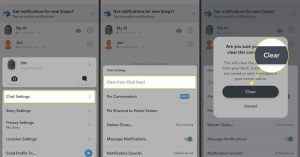
- Open Snapchat.
- Click on your profile in the top left, then the gear icon to go to your settings.
- Scroll down and find the option labeled ‘AI Selfies.’
- Once you’re in the AI Selfies section, look for the ‘Clear AI Selfies’ option.
- Tap on this option to delete any AI-generated Dreams you have created. This will remove all previously generated AI images from your account.
- Toggle off the Dreams option to disable the feature on your Snapchat account and prevent future AI Dream creations.
Conclusion
To conclude, the process of eliminating ‘AI Dreams’ on Snapchat is straightforward and allows you to customize your app in a way that suits your personal preferences. By understanding the options available to you, you can streamline your Snapchat experience and focus on the features that truly enhance your interactions.
Regular maintenance of your settings can keep your app aligned with your goals, ensuring a seamless user experience. As we navigate through the various tools that social media offers, being proactive about your choices is key.
Faq’s
What is the AI Dreams thing on Snapchat?
AI Dreams is a feature on Snapchat that allows users to interact with a virtual AI character, which can generate creative responses based on user prompts.
Can I get AI off Snapchat?
Yes, you can disable or remove the AI feature from your Snapchat settings if you no longer wish to use it.
How do I turn my AI off?
To turn off the AI, go to your Snapchat settings, find the AI option, and toggle it off.