Remove Bitmoji from Snapchat (Step-by-Step Guide) 2026
If you’re looking to removing bitmoji from snapchat, you’re certainly not alone. Many users enjoy linking their Bitmoji to personalize their profiles, chats, and the Snap Map. However, there are various reasons you might want to disconnect it, from prioritizing privacy to seeking a more minimalistic aesthetic.
In this complete guide, you’ll discover how to Remove Bitmoji from Snapchat quickly and easily. We’ll walk you through the steps required to unlink your Bitmoji account, ensuring you can do so without any hassle.
Additionally, we’ll discuss what happens after you unlink your Bitmoji and how it affects your Snapchat experience. Plus, you’ll find answers to common questions regarding this process.
Whether you’re ready for a fresh start or just want a cleaner look, you’ll find all the information you need right here.
What Is Bitmoji on Snapchat?
Bitmoji is a custom cartoon character that symbolizes your identity on Snapchat.
 After connecting it to your account, it enhances your profile’s expressiveness and entertainment value. Nonetheless, some users prefer not to have a cartoon avatar permanently associated with their profiles.
- On your profile
- In chats
- On Snap Map
- In stickers and stories
Why Remove Bitmoji from Snapchat?
Here are some common reasons users decide to unlink their Bitmoji:
- You want a more private or minimal profile
- You created a new Bitmoji and want to reset it
- You no longer use Bitmoji
- You’re experiencing syncing or display issues
- You prefer using only your display name without an avatar
Whatever your reason, removing Bitmoji from Snapchat is quick and simple.
How to Remove Bitmoji from Snapchat (Step-by-Step)
Follow these simple steps:
- Open Snapcha: Launch the Snapchat app on your phone and log into your account.
- Go to Your Profile: Tap your profile icon in the top-left corner of the screen.
- Open Settings: Tap the gear icon in the top-right corner to access Settings.
- Tap “Bitmoji”: Scroll down and select the Bitmoji option.
- Select “Unlink My Bitmoji”: Tap Unlink My Bitmoji, then confirm your choice.
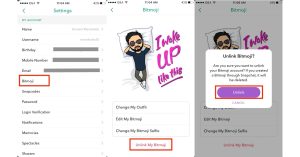
That’s it! Your Bitmoji will be removed from your Snapchat account instantly.
What Happens After You Unlink Bitmoji?
When you remove Bitmoji from Snapchat:
- Your avatar disappears from your profile
- Your Bitmoji will no longer appear in chats
- Your Snap Map icon will revert to the default ghost icon
- Bitmoji stickers will no longer be available
Important: Your Bitmoji account itself is not deleted—only unlinked from Snapchat.
How to Permanently Delete Your Bitmoji Avatar
If you want to completely delete your avatar instead of just unlinking it, follow these steps:
- Open the Bitmoji app
- Tap the Settings gear icon
- Select My Data
- Tap Reset Avatar
This removes your created character permanently.
Can You Relink Bitmoji After Removing It?
Yes! You can reconnect your Bitmoji anytime.
To relink:
- Open Snapchat
- Go to Settings
- Tap Bitmoji
- Choose Create My Avatar or Link Existing Bitmoji
Your avatar will appear again across your account.
Common Issues When Removing Bitmoji
At times, users encounter minor difficulties when attempting to delete Bitmoji from Snapchat.
“Unlink” Option Not Showing
- Update Snapchat to the latest version.
- Restart your app.
- Clear app cache in Snapchat settings.
Bitmoji Still Appears After Unlinking
- Log out and log back in.
- Reinstall the Snapchat app.
Usually, these steps fix syncing issues quickly.
Is Removing Bitmoji Safe?
Yes, unlinking Bitmoji is completely safe. It does not:
- Delete your Snapchat account
- Remove your friends
- Affect your Snap score
- Delete your chat history
It only removes the avatar connection.
Frequently Asked Questions
Is it Possible to Remove Bitmoji From Snapchat?
Yes, you can unlink your Bitmoji from Snapchat by going into your account settings and disabling it.
How Do I Remove Snap Bitmoji in 2025?
To remove your Snap Bitmoji, access your Snap settings, find the Bitmoji section, and select the option to unlink or delete it.
How Do I Write a Bio on Snapchat?
To write a bio, go to your profile, tap on “Edit Profile,” and then enter your bio in the designated field.
Can I Delete My Bitmoji Account Permanently?
Yes, you can delete your Bitmoji account by going to Bitmoji settings in the app and following the prompts to delete it.
Final Thoughts
Remove Bitmoji from Snapchat allows you to take charge of your profile and enhance your privacy. Whether you’re aiming for a more minimalist appearance or simply seeking a fresh look, unlinking your Bitmoji is an effortless process that requires just a few taps.
To Remove Bitmoji from Snapchat, navigate to your profile settings. Once there, select the Bitmoji option and follow the prompts to unlink. This action will clear your Bitmoji from your display, giving your profile a streamlined aesthetic.
Additionally, if you’re experiencing issues with how your Bitmoji appears or are updating your Snapchat profile, disconnecting your Bitmoji can be an effective solution. The best part? You can easily relink your Bitmoji at any time, restoring your favorite personalized avatar. Enjoy the freedom to customize your Snapchat experience as you see fit!