How Use Snow, Snapchat Like App 2026 Update
How Use Snow Snapchat Like App: Have you ever wished for a way to add an extra layer of creativity to your photos and videos. Snow is not just another Snapchat-like app; it offers an array of stunning filters and effects that can make your content truly stand out.
In this article, we’ll explore the essential features of Snow and provide tips for using them effectively, so you can impress your followers and bring your social media presence to the next level.
Setting up Snow on your iPhone or Android smartphone
You can freely obtain the Snow app from either the Google Play Store or the Apple App Store. When you launch Snow for the first time on your smartphone, it will prompt you to log in using your Facebook or Line account, or you can create an account with your email address. Once you’ve logged in, the app will guide you through setting up your username and entering your phone number.
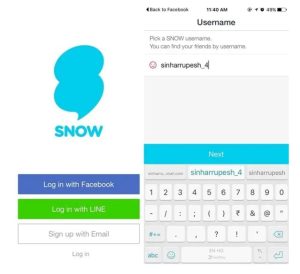
After that, it will check your contacts to find any friends who are also using Snow. Subsequently, a captivating video will play to showcase the app’s features. If you wish to bypass it, you can simply tap “Start” to access the app directly.

Use the Snow app
When you launch the app, the first thing that catches your eye is its interface, reminiscent of Snapchat with some subtle differences. Like Snapchat, the app starts with the camera view. It also includes sections for stories and snaps that you can access by swiping left or right.
The primary distinction in the interface is that you can reach the Settings page from the chat screen in Snow. Now, that’s a creative touch!

Now that we have talked about the Snow UI in brief, let’s get to using the app:
Send a Snap/Video
Similar to Snapchat, you can easily click the capture button to snap a photo or press and hold to record a video. Additionally, you can enhance your images with filters and explore fun, whimsical lenses.
A notable advantage of Snow is its wide array of unique lenses, in addition to familiar ones like the dog lens and face swap lens found in Snapchat. The app also offers various data filters to adjust your images, plus options to add text, emojis, and doodles.
Furthermore, Snow includes an exciting GIF mode, making it perfect for tapping into the current social media trend of GIF sharing.

Share a Snap/Video
With Snow, you can share your photos or videos with friends or post them to your “story.” The exciting part is that the app allows you to also share your snaps to social media platforms such as Facebook, Twitter, Instagram, and Line. Snaps featured in “My Story” last for 48 hours, unlike the 24-hour limit on Snapchat. Additionally, you can upload videos to “LIVE,” which will be visible for 24 hours before they vanish without leaving any trace.
When you send snaps to friends, they are temporary, and you can set a timer for them, similar to Snapchat. The app will also alert you if someone takes a screenshot.

Chat with your friends
The messaging functions in Snow closely resemble those of Snapchat. You’re able to send text messages, video notes, snaps, and stickers, but there’s no option to upload photos from your Gallery.

Additionally, unlike Snapchat, Snow doesn’t support video calling.
Try the Snow app, if you want a Snapchat clone
You’ve probably observed that Snow resembles Snapchat quite a bit in terms of user interface and functionality. Although Snow is missing some features that Snapchat offers, it does introduce a few distinct elements of its own.
That said, these unique elements are somewhat limited. If you’re looking for a Snapchat alternative or have some free time, consider trying out Snow — you might find that you enjoy it!
Conclusion
To conclude, Snow is an excellent addition to your Snapchat toolkit, allowing for more dynamic and entertaining communication. Its array of effects and augmented reality features can make even the simplest snap incredibly enjoyable.
Whether you’re trying to send a silly selfie or a creative message, Snow provides ample opportunities to showcase your imagination. Remember, the key to making the most of Snow is to explore and have fun with it. So go ahead, unleash your creativity, and start snapping with Snow now!
Faqs
What is Snow?
Snow is a social media app similar to Snapchat that allows users to share photos and videos with fun filters and effects.
How do I create an account on Snow?
You can create an account by downloading the app from the App Store or Google Play, then signing up using your phone number or social media account.
How can I add friends on Snow?
You can add friends by searching for their usernames, syncing your contacts, or sharing your unique Snow QR code.
What kind of filters does Snow offer?
Snow offers a wide range of filters, including beauty enhancements, animated effects, and seasonal themes.
Can I save photos and videos from Snow?
Yes, you can save your creations to your device or share them directly to other social media platforms.
How do I send a message or video to a friend?
Tap on your friend’s profile, select the message icon, choose your media, then send it directly within the app.
Is my data private on Snow?
Snow takes user privacy seriously, implementing security measures, but always review the privacy settings to control your information.
Can I use Snow on a tablet?
Currently, Snow is optimized for mobile devices and may not provide full functionality on tablets.
Conclusion
To conclude, Snow is an excellent addition to your Snapchat toolkit, allowing for more dynamic and entertaining communication. Its array of effects and augmented reality features can make even the simplest snap incredibly enjoyable.
Whether you’re trying to send a silly selfie or a creative message, Snow provides ample opportunities to showcase your imagination. Remember, the key to making the most of Snow is to explore and have fun with it.
So go ahead, unleash your creativity, and start snapping with Snow now!